
For housebuilders and housing partners
Quality assurance for housebuilders
We inspect finished homes, record defects by plot and help your teams track repairs through to reinspection.
Developer portal sign-inRead the video transcript
Across every development, small issues create a lot of coordination. Inspections, reports, contractors and conversations need to stay connected. Premier Snag brings that work into one clear developer portal, helping your team understand the position and decide what needs attention next.
Start with a shared overview of your developments. See inspection activity, snag rates, targets and recorded fix progress together, then focus on the sites and reporting period that matter to you.
Arrange inspections around the plot and package you need. Choose an available date and arrival time, confirm contact and access details, and keep upcoming and completed visits in a searchable register.
When a report is ready, move from the surveyor’s overview to individual findings, rooms, trades and photographs. Search the digital report, record progress and notes, or download the inspection PDF and snag schedule. Original findings remain separate from your team’s repair updates.
Connect the work to the right trade, automatically or manually. Organise trade categories and site or plot coverage, then assign relevant findings. Temporary viewing links let you share the details.
PS Trades connects that plan to the work on site. Tradespeople see assigned jobs, read the original issue, exchange messages and submit photos or video. The site team reviews the evidence, returns work that needs attention, or accepts the fix, keeping the conversation and decision with the snag.
Step back to see the wider pattern. Explore findings by trade, site, room or recurring fault, compare your developments and follow the numbers down to the inspection evidence. Turn quality reviews into a clearer discussion about where to focus.
Preparing for your next team meeting? Ask Premier AI anything about your inspections: which trades have the most snags, or what still needs attention. Then ask it to prepare an editable PowerPoint presentation, ready to present to your team.
Give each colleague appropriate development access, with email-code sign-in and roles suited to their responsibilities. Let colleagues choose the site updates they follow. Keep the office, site team and trades connected around the same work.
Discover a clearer way to coordinate inspection quality. Book a Premier Snag demonstration.
Premier Snag reviews

As featured on:
Snagging inspector training
Enhanced Quality Assurance
How we fit into your handover
Give site managers, contractors and customer care a shared record of what was found, what was repaired and what still needs attention.
Agree the inspection brief
Tell us which plots are ready, what you need checked and when your team needs the findings. We agree safe access, scope and report timing before the visit.
Inspect and record each plot
An independent inspector checks accessible finishes, fixtures and workmanship. Each finding identifies the location, describes what was observed and includes photos where appropriate.
Send the findings to the right trade
Share the relevant snags and photos with the trade doing the repair. For jobs you want to track, assign the work in the developer portal and review the repair evidence submitted through PS Trades.
Recheck and spot patterns
Arrange a return visit for agreed items once repairs are ready. With the right portal access, review recurring findings across plots, trades and developments to guide future checks.
Developer portal
From plot inspection to repair review
These screens show a demo account with fictional data.
Keep track of inspections by plot
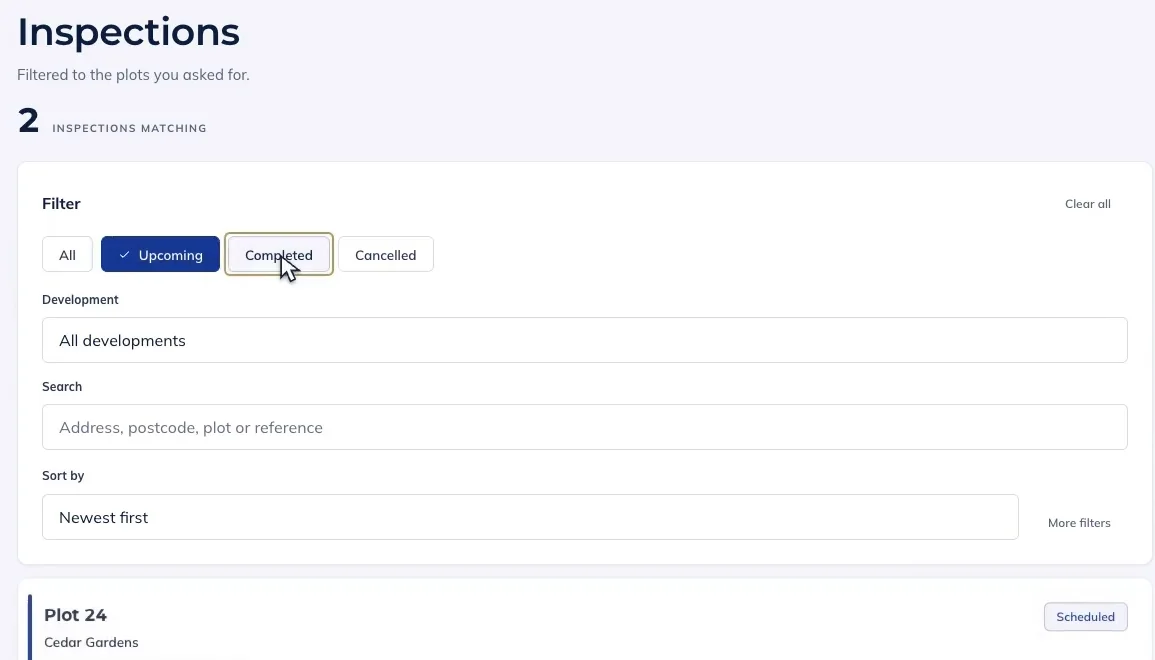
Book inspections against a development and plot. Find scheduled and completed visits in one register, with filters for the site and inspection status.
Find the snag and see the evidence
Search the original photographic findings or group them by room or trade. Download the inspection PDF or the snag schedule.
Assign work by trade and plot
Set which trades cover each development or plot range. Route findings automatically where rules apply, or assign individual snags when a job needs a specific person.
Send repair evidence from site
Tradespeople can see assigned jobs, message the site team and submit a photo or video of the completed work through PS Trades.
Review the fix against the original finding
Compare the trade’s evidence with the inspector’s photograph. Accept the fix or send it back for more work, with a record of the decision on that snag.
See where the same snags keep appearing
When you have access to multiple developments, compare their findings side by side. Explore by site, room, trade or recurring fault and open the inspection evidence behind the numbers.
Homeowner portal
What buyers see in their portal
These examples show Premier Snag’s existing homeowner portal. If you want a buyer-facing journey on your development, we’ll agree what is shared and who can see it before rollout.
Find a snag and its photos
Buyers can search their snagging report by keyword and filter findings by room or trade.

Keep a copy of the report
Buyers can download a PDF of their completed snagging report for their records.

Rollout
Start with one plot
See what the report gives your site and customer care teams before deciding how to use the service across a phase or development.
Tell us about your development- Trial visit
- Agree a finished plot and the checks it needs. Use the report and snag schedule to review the findings with your team.
- Team onboarding
- Walk through bookings, reports and repair evidence with site and customer care leads. Agree who needs access and which sites they need to see.
- Programme scope
- Agree plot volumes, visit timing, rechecks and any buyer access or integration work. We price the programme around those decisions.
Questions from housebuilders
Can we trial this on one plot?
Yes. Tell us which finished plot is available and who needs to see the results. We’ll agree the inspection scope, quote and report timing, then walk your team through the report and the portal.
When should we arrange a quality assurance inspection?
Arrange it when the work you want checked is finished and the plot is safe to access. Share your handover dates and which homes are ready in each phase so we can plan visits around your programme.
How does this work with our site checks or clerk of works?
We can check selected plots alongside your existing quality process or provide extra capacity on a development. Agree which plots and visible items we should check, and who on your team will review the findings.
Who carries out the repairs?
Your appointed contractors carry out repairs. Premier Snag records independent findings and can revisit agreed items once the remedial work is ready. Formal sign-off and statutory approvals sit with your project team and appointed specialists.
Can our buyers see their report?
We’ll agree the approved documents, sharing method and who handles any questions with your customer care team. A buyer-facing portal journey can be scoped separately to fit your handover process.
Can you work alongside our existing systems?
If you use COINS or another platform, tell us how you record plots, raise defects and close work. We can review what should move between systems and agree the scope of any integration before rollout.
How do you quote for a programme?
We look at the developments, plot numbers, visit pattern and any rechecks, training or portal setup you need. You’ll get a proposal for that scope before you commit.
Developer enquiries
Tell us what you’re building
Share a site, your next handover date or the kind of support you need. We can talk through a trial plot, a portal demonstration or a programme across developments.
0800 870 8466